
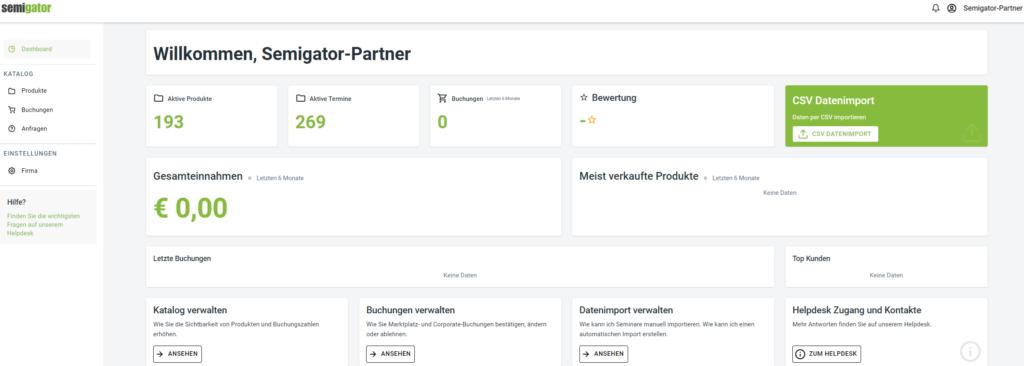
Welcome to Semigator!
You have logged into your account for the first time and are on the dashboard of your Semigator account.
From the homepage, you can access all relevant aspects of your account. Start with:
- Check your master data for correctness – a valid VAT identification number/tax number is particularly important for our accounting department.
- Upload your company logo with max. 500×500 pixels. Allowed formats: PNG, JPG, JPEG.
- Write a company profile to present yourself to your potential customers in the best possible way. Here you can explain your company philosophy/history/values, for example.
- Note: Each organizer can create their own company profile. Your logo will appear on every product page.
- As a contractual partner , your company profile is publicly visible as an additional service and can be found under your company name. Your events are also presented here and you can be contacted directly by customers. A prerequisite is the creation of a product.
- Here you can create and manage your events, dates and tickets for the Semigator catalog. We recommend creating a temporary placeholder product.
- You can find our comprehensive guide to the instructions here.
- If you do not want to create your products individually, but prefer to import them via CSV file or API interface, you will find all the necessary information in the articles on data import.
- Here you will find the overview and the necessary actions for your bookings.
- Bookings can be reserved, confirmed or rejected.
- The most common reasons are listed for quick selection – simply click and send. If none of the reasons apply, you can let us know via “Other reason”.
- All further details on bookings and the differences between “Marketplace” and “Corporate” bookings can be found here.
- Contact requests from interested customers appear here, which can be made either on your public profile page or directly in relation to one of your products. In many cases, these products are only visible in customers’ closed catalogs, depending on your contractual relationship with Semigator.
- You also receive each contact request from Semigator by e-mail and take over further communication with the interested party from this point on.
Related articels:
Product groups: Discounts and visibility settings are managed here. This is not a standard function and must first be activated for you by Semigator. For details, please read here.
Marketing options: Information about ranking and ads, how they can be created and booked and also, can be found here.
Change access data: You can find out how to enter or change your information here.

